


WhatsApp Android Chat Bar Redesign: New Message Box and Send Button Changes Spotted
WhatsApp is reportedly working on a redesigned chat bar for its Android application, bringing a fresh look to the area users interact with every day while sending messages. The upcoming change focuses on the message input field, emoji control, attachment options and send button, with the aim of creating a cleaner and more organised chatting experience.
According to a report published by WABetaInfo on October 17, 2026, the new design has been spotted in development in WhatsApp beta for Android version 2.26.41.11. The company is exploring two different layouts before deciding which version, if any, will be released to users. The feature is not yet available to beta testers, and WhatsApp has not announced an official rollout date.
The redesign may appear relatively small, but the chat bar is one of the most frequently used parts of WhatsApp. Millions of people rely on it for personal conversations, office communication, group discussions, sharing photos and sending voice messages.
Here is everything you need to know about the WhatsApp Android chat bar redesign, its expected changes, possible benefits and availability.
WhatsApp Chat Bar Redesign: What’s New?
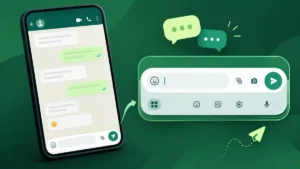
The main change concerns the arrangement of the message composer at the bottom of a conversation. WhatsApp is testing a layout in which the text input field moves to the upper part of the chat bar, while the emoji button and other controls are positioned around it.
Another important change is that the send button moves inside the redesigned chat bar instead of remaining separate from the main input area. The result is expected to be a more integrated interface for writing and sending messages.
The company is reportedly evaluating two layout variations. Although both share the same basic idea, they arrange the attachment, camera, emoji and send controls differently.
These are still experimental designs. WhatsApp could change the placement of individual buttons, combine elements from both versions or decide on another arrangement before a public release.
Two New WhatsApp Chat Bar Designs Under Testing
According to the feature report, WhatsApp is considering two different arrangements for its Android chat composer. Both versions move the text field above the emoji control and integrate the send button into the bar, but their button placements differ.
Design 1: Emoji button on the right
In the first layout, the attachment and camera controls remain on the left side, while the emoji button sits on the right. The send button is integrated into the redesigned composer.
This approach could help keep the main messaging controls together while giving the text input area a clearer position.
Design 2: Send button on the right
The second version uses a different arrangement, placing the attachment and camera controls on the left and the send button on the right. The emoji control is positioned separately within the redesigned input area.
This alternative could make the send action easier to locate for users who frequently type messages and share media.
It is important to note that these are reported development concepts, not two confirmed features that users can currently select. WhatsApp has not confirmed which design will be adopted.
Why Is WhatsApp Redesigning the Android Chat Bar?
WhatsApp regularly experiments with its interface to improve usability and keep the application visually consistent across devices. The chat composer is particularly important because users interact with it repeatedly throughout the day.
A better-organised layout could offer several benefits:
-
Cleaner interface: Grouping related controls may make the message composer look more organised.
-
Easier message typing: A clearly positioned text field could improve the visual separation between typing and other actions.
-
Integrated send button: Keeping the send control within the composer could create a more consistent layout.
-
Improved media access: A predictable position for attachment and camera controls could make sharing content easier.
-
More modern appearance: The redesigned arrangement could give conversations a refreshed look without changing their basic functionality.
These are potential usability benefits rather than confirmed performance improvements. The actual experience will depend on the final design and how well it works across different Android screen sizes.
WhatsApp Android Update: How the New Design May Work
Under the reported design, users would continue opening a conversation and typing messages in the input field at the bottom of the screen. The difference would be how the input field and nearby controls are arranged.
The attachment and camera shortcuts would remain available for sharing documents, photos and other content. The emoji button would still provide access to expressive symbols, while the send button would be incorporated into the updated composer.
The redesign is focused on the visual arrangement of these controls. There is currently no confirmed indication that it introduces a new messaging protocol, changes message delivery speed or alters WhatsApp’s core chat functionality.
Users should therefore view the change as a potential interface improvement rather than a major new messaging feature.

WhatsApp’s Chat Bar Redesign Follows Other Android Interface Changes
The latest experiment comes as WhatsApp continues exploring broader interface changes for Android users. In September 2026, reports revealed work on a redesigned bottom navigation bar featuring rounded corners and a floating appearance.
The navigation bar and chat composer serve different purposes. The navigation redesign concerns switching between the app’s main sections, while the new chat bar focuses on writing and sending messages within individual conversations.
Together, these experiments suggest that WhatsApp is reviewing several parts of its Android interface. However, the company has not confirmed that all these changes will arrive in the same update.
Meta’s broader design approach has previously emphasised simplicity, familiar controls and easier navigation. Its official design discussion explains how WhatsApp updates visual elements while aiming to preserve the app’s recognisable experience.
When Will the New WhatsApp Chat Bar Be Available?
At present, the redesigned chat bar remains under development. The feature was reported in WhatsApp beta for Android version 2.26.41.11, but it is not yet available even to beta testers.
WhatsApp has not announced an official release date, and there is no confirmed timeline for a stable Android update.
The likely next step would be further testing before the company decides whether to distribute the new interface more widely. WhatsApp may also revise the layout based on usability considerations during development.
Users should keep the following points in mind:
-
The redesigned chat bar is not a confirmed public release.
-
Installing the latest WhatsApp version does not guarantee access to it.
-
The two reported layouts may change before launch.
-
There is no confirmed date for the rollout to all Android users.
For reliable updates, users can check WhatsApp’s official announcements and the app’s listing on the Google Play Store.
How to Get the WhatsApp Chat Bar Redesign
Since the feature is still under development, there is currently no official setting that allows users to activate it manually.
Once WhatsApp begins testing the redesign with eligible users, access may depend on the beta version and the company’s staged rollout process.
For now, Android users can follow these steps to keep their app updated:
-
Open the Google Play Store.
-
Search for WhatsApp Messenger.
-
Open the official app listing.
-
Tap Update if an update is available.
Updating WhatsApp ensures access to available improvements, but it does not guarantee that an unreleased feature will appear.
Avoid downloading unofficial APK files or modified WhatsApp applications that promise early access to hidden features. Such downloads can expose personal information and create account security risks.
Will the Redesigned Chat Bar Change WhatsApp’s Existing Features?
The reported redesign focuses primarily on the appearance and positioning of the message input field and its controls. There is no confirmed evidence that it will remove existing messaging capabilities.
Text messages, group chats, photo sharing, document attachments and other familiar functions are not reported to be changing as part of this experiment.
The key question is whether the new arrangement makes these functions easier to access without making the interface more complicated. Feedback from testing, if and when the feature becomes available, will help establish whether the redesign delivers a meaningful improvement.
Frequently Asked Questions (FAQs)

1. What is the WhatsApp Android chat bar redesign?
It is an interface change under development that reorganises the message input field, emoji control, attachment options and send button.
2. Which WhatsApp version includes the new chat bar?
The redesign was reported in WhatsApp beta for Android version 2.26.41.11. However, the feature is not yet available to beta testers.
3. What are the two new chat bar layouts?
Both layouts move the text input field above the emoji control and integrate the send button into the composer. They differ in the arrangement of the emoji, camera, attachment and send controls.
4. When will WhatsApp release the redesigned chat bar?
There is no officially confirmed release date. WhatsApp may change the design during development before deciding on a wider rollout.
5. Can regular Android users access the new design now?
No. The feature remains under development, and installing the latest public version does not guarantee access.
6. Will the redesign change WhatsApp messaging features?
No such changes have been confirmed. Current reports focus on the chat bar’s visual layout rather than new messaging functionality.
Final Verdict
The WhatsApp Android chat bar redesign is a small but potentially useful interface update that could make everyday messaging feel more organised. Moving the text input field, integrating the send button and experimenting with different control arrangements may help WhatsApp create a cleaner conversation screen.
However, the redesign is still at an early development stage, and its final appearance remains uncertain. Android users will need to wait for further testing and an official announcement before they can try it.
For now, the most important takeaway is that WhatsApp is exploring two new chat bar layouts, but neither has been confirmed for public release.