

Samsung Galaxy S23 One UI 9.0 Update: Stable Rollout, Android 17 Features and India Availability
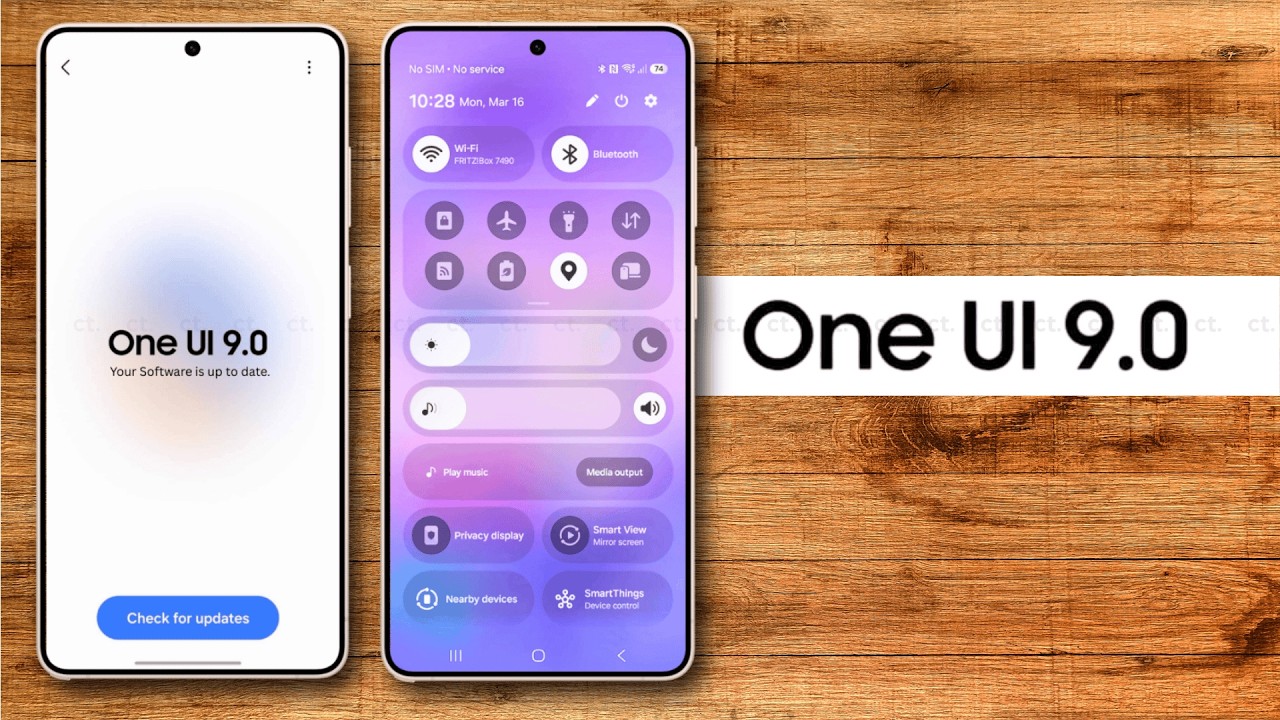
The good news for Galaxy S23 owners is that Samsung has begun rolling out the stable One UI 9.0 update based on Android 17. The initial release appeared for selected beta participants in South Korea, followed by reports of availability expanding beyond the home market. The update brings improvements to Quick Panel customisation, Samsung DeX, Samsung Notes, accessibility and privacy features.
Samsung Galaxy S23 users have a major software update to look forward to as the company expands the availability of One UI 9.0. The latest software, based on Android 17, introduces interface customisation options, improvements to productivity tools, privacy enhancements and additional Galaxy AI capabilities.
The update is particularly significant for the Galaxy S23 lineup because it is expected to be the final major Android OS upgrade promised for these phones. Samsung launched the Galaxy S23 series with Android 13 and committed to four generations of Android OS upgrades.
However, the stable release is rolling out in stages, so not every Galaxy S23 owner will receive the update simultaneously. Here is everything you need to know about the Samsung Galaxy S23 One UI 9.0 update, new features, eligible models, India availability and installation process.
Samsung Galaxy S23 One UI 9.0 Update: Latest News
Samsung has started distributing the stable One UI 9.0 update to selected Galaxy S23 devices. Initial reports from October 14 indicated that the release was available to users who had participated in the beta programme in South Korea. Subsequent reports on October 19 indicated that the rollout had started expanding beyond South Korea, including Europe.
The initial rollout is limited, and availability can depend on the phone model, region and whether the device was enrolled in the beta programme. A wider release is expected to reach additional users as Samsung expands distribution.
One UI 9.0 is based on Android 17 and brings several improvements intended to make Galaxy devices more customisable, useful and secure. The release also introduces changes to Samsung’s productivity and accessibility tools.
For Indian users, the key point is that the stable rollout has begun, but the update may not appear on every Galaxy S23 device immediately. Users should check the Software Update section on their phones for the latest availability.
Samsung Galaxy S23 One UI 9.0 Update Details
Here is a quick overview of the latest software release.
| Detail | Information |
|---|---|
| Update | Samsung One UI 9.0 |
| Android version | Android 17 |
| Eligible lineup | Galaxy S23 series, subject to model-specific rollout |
| Stable rollout | Began in October 2026 |
| Initial availability | Selected beta participants in South Korea |
| Wider rollout | Expanding in stages |
| Major changes | Quick Panel, DeX, Notes, accessibility and privacy |
| India availability | Check the phone’s Software Update menu |
| Expected OS upgrade status | Final major Android upgrade for the S23 generation |
The update is being distributed in phases. Samsung can also adjust rollout timing if it identifies software issues or needs to release a corrective update.
One UI 9.0 Features Coming to Galaxy S23

1. More Quick Panel Customisation
One of the key improvements in One UI 9.0 is greater customisation for the Quick Panel. This is the menu users open by swiping down from the top of the screen to access commonly used controls.
The updated interface provides additional flexibility for organising controls and adjusting the layout to personal preferences. Users who regularly change settings such as Wi-Fi, Bluetooth, brightness and other shortcuts may find the revised layout more convenient.
These changes build on Samsung’s focus on giving Galaxy owners greater control over the appearance and behaviour of their phones. The precise options available can vary according to device and software configuration.
2. Samsung DeX Improvements
Samsung DeX is designed to provide a desktop-style experience on supported Galaxy devices when connected to compatible displays and accessories.
One UI 9.0 includes improvements to DeX, which could make the experience more convenient for people who use their phones for productivity. The feature is useful for managing multiple applications, viewing documents and handling certain work tasks on a larger screen.
The practical benefit will depend on the accessories, applications and connection method used. Users should check their existing DeX setup after installing the update to explore the available changes.
3. Samsung Notes Enhancements
Samsung Notes is another application receiving improvements with One UI 9.0. The app allows users to create written notes, organise information and work with supported document and handwriting tools.
The latest software aims to improve the overall productivity experience. For students, professionals and people who regularly save information on their phones, these changes could make note-taking and organisation more convenient.
Specific functions may vary by device and app version, so users should also check for updates to Samsung Notes through the Galaxy Store.
4. Accessibility Improvements
One UI 9.0 also includes accessibility-related changes designed to make Galaxy devices easier to use.
Accessibility features can help people adjust how they interact with their phones, whether they need improved visibility, easier navigation or support for particular interaction preferences.
These improvements are part of Samsung’s broader software update strategy, which aims to make its devices more adaptable to different users and needs.
5. Privacy and Security Enhancements
Privacy is another area receiving attention in the new software. Reports on the Galaxy S23 update highlight additional privacy-related features, including a location privacy indicator.
Indicators can help users understand when sensitive permissions or information are being accessed. The update also builds on Samsung’s broader efforts to improve device security and make privacy controls easier to manage.
Samsung has also highlighted security and privacy improvements as part of the wider One UI 9 rollout. However, the availability of individual features may vary by region, model and supported application.
Users should continue installing security patches even after upgrading to Android 17. A major operating system update does not replace the need for ongoing security maintenance.
6. New Galaxy AI Capabilities
One UI 9 introduces additional Galaxy AI experiences across supported devices. Samsung has highlighted features designed to make content creation, daily summaries and device management more personalised.
Examples from Samsung’s wider One UI 9 announcement include My FanCam, which can keep a selected person centred in supported videos, and editable cards in Now Brief. Samsung has also announced improvements to device-care tools and scam detection in supported markets.
However, users should not assume that every new Galaxy AI feature announced for newer flagship devices will be available on the Galaxy S23. Feature availability depends on hardware capabilities, region, language, application support and Samsung’s implementation for each model.
The final feature set on the S23 should be confirmed from the installed software and Samsung’s official documentation.

Which Samsung Galaxy S23 Models Are Eligible?
The main Galaxy S23 family includes the following devices:
- Samsung Galaxy S23
- Samsung Galaxy S23+
- Samsung Galaxy S23 Ultra
- Samsung Galaxy S23 FE
Samsung has confirmed the Galaxy S23 generation’s eligibility for One UI 9.0 as part of its promised major Android upgrade commitment. Reports of the initial stable rollout specifically highlighted the Galaxy S23, S23+ and S23 Ultra, while the S23 FE’s availability may follow a different schedule.
Owners should therefore check their exact model number and current software version before expecting an update notification. Carrier-specific devices and regional variants can receive software at different times.
How to Download One UI 9.0 on Samsung Galaxy S23
If the stable update is available for your phone, follow these steps:
- Open Settings on your Samsung Galaxy S23.
- Scroll down and select Software update.
- Tap Download and install.
- Allow the phone to check for available updates.
- If One UI 9.0 appears, select the download option.
- Wait for the download to finish and follow the installation instructions.
Before installing, connect your phone to a reliable Wi-Fi network and ensure the battery is sufficiently charged. Backing up important files is also recommended.
If the update is not available, it does not necessarily mean your phone is ineligible. The rollout may not have reached your region or particular device yet. Check again later rather than installing firmware from an unverified source.
Is One UI 9.0 the Last Major Update for Galaxy S23?
The Galaxy S23 series launched with Android 13 and was promised four generations of Android OS upgrades. Android 17, delivered through One UI 9.0, is expected to complete that commitment.
This does not automatically mean that software support ends immediately after One UI 9.0. Major Android upgrades and security updates are different things. Samsung may continue providing security maintenance for a period according to its support policy.
Owners who are satisfied with the Galaxy S23’s performance may therefore continue using the device after the major OS upgrade, provided it remains suitable for their needs and receives the applicable security updates.
The update may also extend the phone’s useful life by bringing newer software capabilities, although some features may remain exclusive to newer hardware.

Should Galaxy S23 Users Install One UI 9.0?
For most eligible users, installing the stable update once it becomes available is a sensible choice. It brings the latest supported Android generation, interface changes and improvements to productivity, accessibility and privacy.
However, people who rely on their phones for work should consider waiting briefly if they need to confirm that essential applications and accessories work correctly with the new version.
After installing, check battery consumption, mobile connectivity, Bluetooth, camera functions and frequently used applications. If you encounter an issue, consult Samsung’s support resources and check for subsequent software patches.
Beta users should be particularly careful to read the installation instructions and confirm that the stable release is available for their exact device.
Frequently Asked Questions (FAQs)
1. Has Samsung released One UI 9.0 for the Galaxy S23?
Yes. The stable Android 17-based One UI 9.0 rollout has begun for selected Galaxy S23 devices, with availability expanding in stages.
2. Is One UI 9.0 based on Android 17?
Yes. One UI 9.0 is Samsung’s software interface based on Android 17.
3. When will the Galaxy S23 receive One UI 9.0 in India?
The rollout is phased, and availability can vary by model and region. Check Settings → Software update → Download and install for the latest status on your phone.
4. Which Galaxy S23 models are eligible?
The Galaxy S23, S23+ and S23 Ultra are included in the eligible lineup. The Galaxy S23 FE is also expected to receive One UI 9.0 under the same major-upgrade commitment, though its rollout timing may differ.
5. What are the main One UI 9.0 features?
Highlights include Quick Panel customisation, DeX and Notes improvements, accessibility enhancements, privacy indicators and additional Galaxy AI capabilities on supported devices.
6. Is One UI 9.0 the final major Android update for Galaxy S23?
Yes, it is expected to be the final major Android OS upgrade under Samsung’s four-generation commitment. Security updates may continue separately under the applicable support policy.
7. What should I do if the update is not showing?
Check again later, confirm your phone’s model and current software version, and use Samsung’s official update channel. Avoid downloading firmware from untrusted websites.
Final Verdict
The Samsung Galaxy S23 One UI 9.0 update is an important release for owners of Samsung’s 2023 flagship lineup. Based on Android 17, the software brings a more customisable interface, improvements to Samsung DeX and Notes, accessibility changes and privacy-related enhancements.
The stable rollout has started, but availability remains dependent on the device, region and rollout phase. The update is also expected to mark the final major Android OS upgrade promised for the Galaxy S23 generation, making it a significant milestone for long-term users.
If you own a Galaxy S23, S23+ or S23 Ultra, check the Software Update menu regularly and install the stable release when it becomes available for your device.